
Pasted all at once
Every word arrives togetherA LITTLE ROOM TO WRITE
A blank page. A prepared draft.
01 / 01The whole draft, one insertion
- Input events
- 0
- Largest insert
- 0 chars
- Corrections
- 0
Turn your prepared draft into character-by-character typing in Google Docs. Set the speed. Add a pause. Stay in control.
Install from the official Chrome Web Store listing.
Every useful draft starts with an idea.
The same draft, two ways in. Watch a paste arrive at once, then see AutoType build it one character at a time.
Two independent, illustrative animations at 6× speed. Counters describe this sample, not an external activity report.
Pasting adds a block in one step. AutoType spreads the input over time, with the pace and optional corrections you choose. Here is what the sample above contains at 55 wpm.
| In this preview | Pasted in | AutoType |
|---|---|---|
| Sample session length | 00:01 | 01:08 |
| Input events | 1 | 267 |
| Largest single insert | 265 chars | 1 char |
| Corrections | 0 | 1 |
| Pauses over three seconds | 0 | 2 |
Calculated from this illustrative preview. These are not measured results from an external editor or replay tool.
Bring text from RewriteMax or anywhere you write. Your document stays the place where the work happens.
Use Add to Chrome to open the official Chrome Web Store listing and confirm installation.
Sign in with your RewriteMax account and confirm the extension connection. A free account types up to 500 words a day.
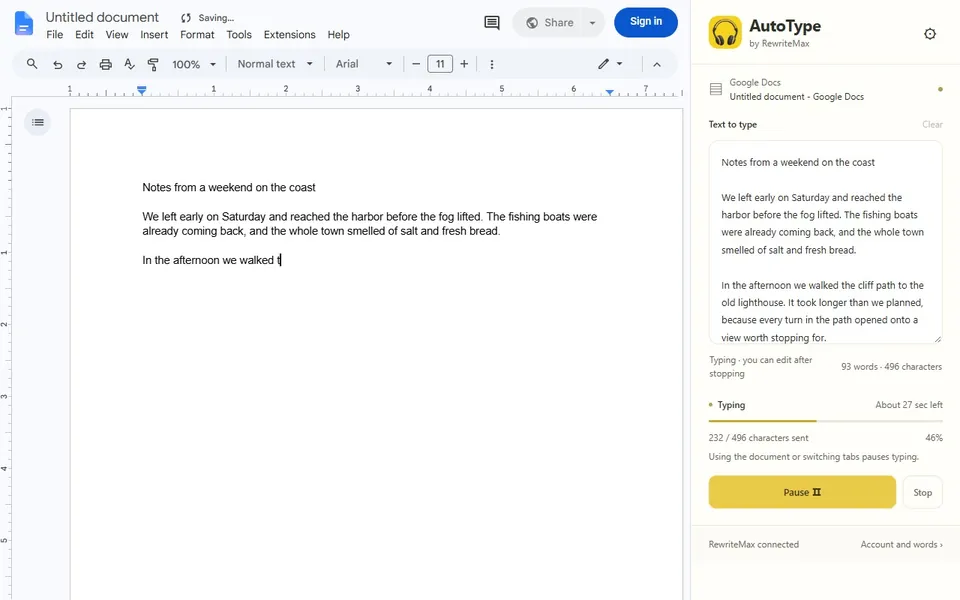
Click inside your Google Docs document, add the draft to the extension, adjust the settings, and start.
Spend less time entering a finished draft. Speed, pause and resume come with every account; rhythm and corrections come with paid plans.
Let the speed vary within your settings, with a pause at punctuation and a longer beat between paragraphs.
Optional English typos are backspaced and corrected. Short text replays retype your original words.
Choose the speed on any account. On a paid plan, tune pauses and corrections, or turn them off whenever you prefer a simpler session.
Pause, continue or stop from the panel whenever you like. Esc pauses too.
Typing pauses when you use the document or switch tabs, so nothing lands in the wrong place. Go back and press Resume.
Refresh or close the tab, and your saved progress waits in your browser. Check the document, place the cursor and continue from there.
Made for editable documents in desktop Chrome. Keep the document open and let AutoType work beside your draft.
Type, pause and continue. Your draft and progress stay in your browser, so you can pick up after a refresh.
Not supported yet. AutoType works in Google Docs for now.
A free account types up to 500 words a day at a steady speed. Paid plans add natural typing and use your plan’s monthly words, shared with rewriting and read-aloud.
Compare plans ↗A longer draft pauses at the free limit and can continue the next day. On a paid plan, typing a draft you already humanized uses plan words again; each use is counted. Add-on word packs add to the same words. Natural typing and bonus words need an active paid membership or the $3 Pro trial. Referral bonus words do not expire and are used only for AutoType once plan words run out; inviter rewards are capped at 10,000 per UTC month.
AutoType Freewith a free account
AutoType Proin every paid plan and the trial
Each of these types prepared text into Google Docs. AutoType works in fewer places than some, and it asks for no access to your Google account.
| Compare | AutoType | Duey | Human Auto Typer | Write It | Dripwriter |
|---|---|---|---|---|---|
| Works in | Google Docs | Google Docs, Slides, Word Online | Google Docs and other text fields | Google Docs, Slides, Word on the web | Google Docs |
| Free use | 500 words a day | Free, listed as unlimited | Free plan, limit not stated | Free to start, limit not stated | 250 words a day |
| Account for free use | Free account needed | Not needed | Not needed | Not stated | Not stated |
| Paid price | From $9.99 a month, or $3 for a 3-day trial | $9.99 a month, or $5 a month billed yearly | $5.99 a month | $10 a month, billed by semester | $9 a month billed yearly, or $8 for a day pass |
| Typos and pauses | Paid plans, each adjustable | Yes | Yes, in Human Mode | Yes | Yes |
| Keeps typing if you leave the tab | No, it pauses | Homepage says keep the tab active; Sessions runs on its servers | Not stated | Scheduled jobs with Cloud Typer | Yes, it runs on its servers |
| Connects to your Google account | No | Not stated | Not stated | Not stated | Yes, to the document you pick |
From each product’s public pages, read on November 5, 2026. Prices and limits change. “Not stated” means we did not find it on those pages. We have not tested the other products.
More detail: seven auto typers compared and Duey alternatives.
AutoType makes no claims about AI detection or revision history, and it is not a way to show that you wrote something by hand. Some other tools advertise this; we have not tested those claims.
An auto typer, also called a typing simulator or human typer, enters prepared text one character at a time. RewriteMax AutoType is a Chrome extension for Google Docs, with adjustable speed, pause and resume. Paid plans add natural typing, such as adjustable typos and rewrites.
Choose Add to Chrome on this page, confirm installation on the official Chrome Web Store listing, then connect your RewriteMax account.
No. AutoType is a Chrome extension, so there is no separate app to download. Add it from the Chrome Web Store, then connect your RewriteMax account. It runs in desktop Chrome.
Yes, in editable Google Docs documents in desktop Chrome. Word Online and mobile browsers are not supported yet. Open the document and click where typing should begin.
Yes, in Google Docs only. Paste your draft into AutoType instead of into the document, and it types the text into the document one character at a time at the speed you set. It does not type into other apps or websites.
Not yet. AutoType types only into Google Docs documents in desktop Chrome, so it cannot type into Google Slides or speaker notes.
Not directly. It does not type into Word on the web or the Word desktop app. Type into a Google Doc instead, then choose File > Download > Microsoft Word (.docx). For an existing Word file, upload it to Google Drive, open it with Google Docs, choose File > Save as Google Docs, and type into that copy.
Yes. Every account can set the typing speed. Paid plans can also choose speed variation, punctuation pauses and paragraph pauses, and adjust or turn off typo corrections and short text replays.
These effects come with paid plans. Optional English typos are briefly typed, deleted with backspace and corrected. Short text replays delete and retype the original passage. The aim is to preserve your supplied text; review the document when the session finishes.
With Save progress on, your draft and progress stay in your browser for up to 14 days. Open the document again, check what is already there, place the cursor, then resume. You can also start over.
No. Typing pauses when you switch tabs, so keep the document in front, then go back and press Resume. Using the document or a lost connection also pauses it, so you can check it before continuing.
Yes, to start. You need a RewriteMax account, which is free to create. A free account types up to 500 words a day at a steady speed, renewed at 00:00 UTC. A longer draft pauses at the limit and can continue the next day. An active paid membership or the $3 Pro trial adds AutoType Pro, with adjustable typos, rollback, pauses and paragraph review, and uses your plan’s monthly words, the same words used for rewriting and read-aloud. Add-on word packs add to them. Verified new referrals award 1,000 bonus words to each person, used only for AutoType on a paid plan once plan words run out; they do not expire, and inviter rewards are capped at 10,000 per UTC month.
Free words do not; they are counted separately. On a paid plan, yes: rewriting, read-aloud and AutoType all use your plan’s monthly words. AutoType counts each English word and each Han character as one word. Typing a draft you already humanized uses words again, because each use is counted. Continuing the same task and replaying corrections do not create duplicate charges. Unused reserved words are returned when a task stops or expires.
It does not read your document’s text. While typing, it sends keystrokes to the document page, looks at where the cursor is, and pauses when you use the document. Your draft and saved progress stay in your browser, and RewriteMax receives only word counts and hashed identifiers.
AutoType enters text you have already prepared. To change the wording first, use the RewriteMax Humanizer or another writing tool, review the result, then give the approved text to AutoType.
Bring your words to Google Docs, at a pace you choose.
Add to ChromeChrome desktop · 500 free words a day · Natural typing with a paid plan
Last updated